
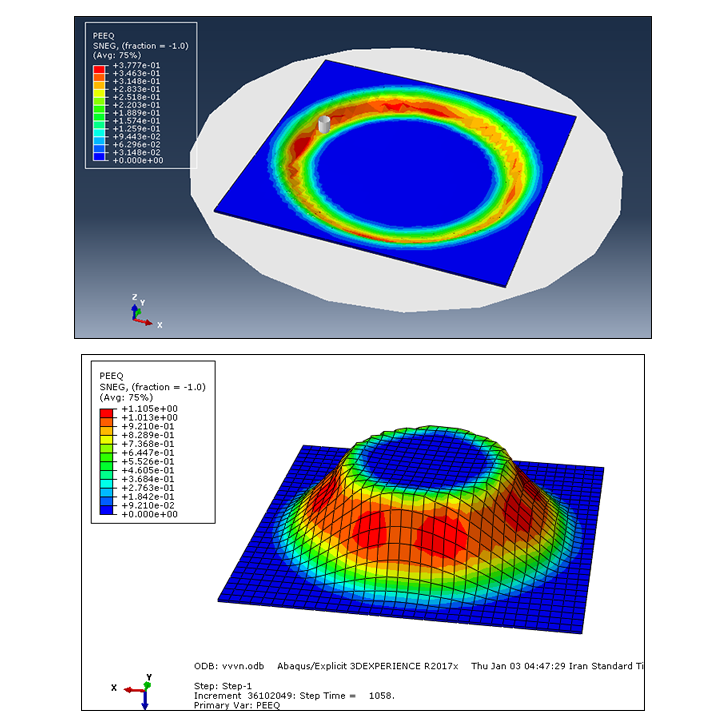
Project Overview
In this Abaqus tutorial, the Incremental Sheet Forming (ISF) process is simulated. ISF is a flexible sheet metal forming process that can be used to manufacture complex shapes without requiring rigid and dedicated clamping systems.
In this example, an aluminum sheet with a length of 230 mm, a width of 230 mm, and a thickness of 1.5 mm is formed using a forming tool.

Incremental sheet forming process modeled in Abaqus.
Forming Tool and Contact
The forming tool moves over the aluminum sheet and gradually deforms it. The coefficient of friction between the sheet and the tool is defined as 0.15.
The forming tool follows a circular path in the X-Y plane. The continuous movement of the tool gradually changes the shape of the sheet.

Circular tool path in the X-Y plane during the ISF process.
Analytical Rigid Surface
The forming die is modeled using a three-dimensional analytical rigid surface. The aluminum sheet interacts with the rigid forming surface during the simulation.
Final Shape of the Sheet
As the forming tool follows its predefined circular path, the aluminum sheet is gradually deformed. The final shape obtained in this simulation is a truncated cone.

Final truncated cone shape obtained after the ISF process.
Diameter of the Formed Shape
The formed geometry contains circular sections with different diameters. The maximum circle diameter is 194 mm, while the minimum circle diameter is 106 mm.
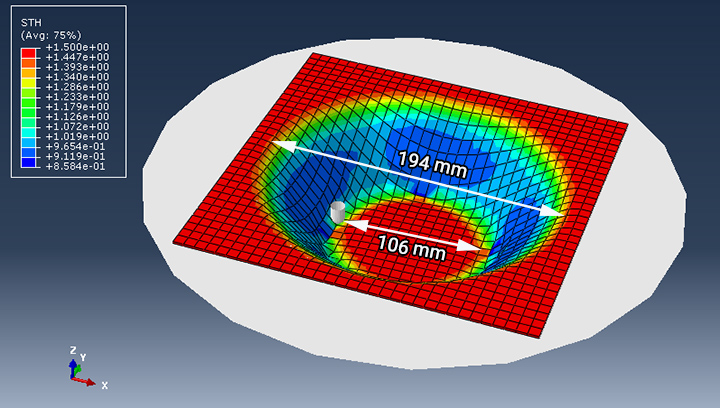
Maximum and minimum circular diameters of the final formed shape.
Advantages of Incremental Sheet Forming
Incremental Sheet Forming allows complex products to be manufactured without using rigid and dedicated clamping systems. As a result, the process can reduce manufacturing costs and production time, particularly for flexible and small-batch manufacturing applications.
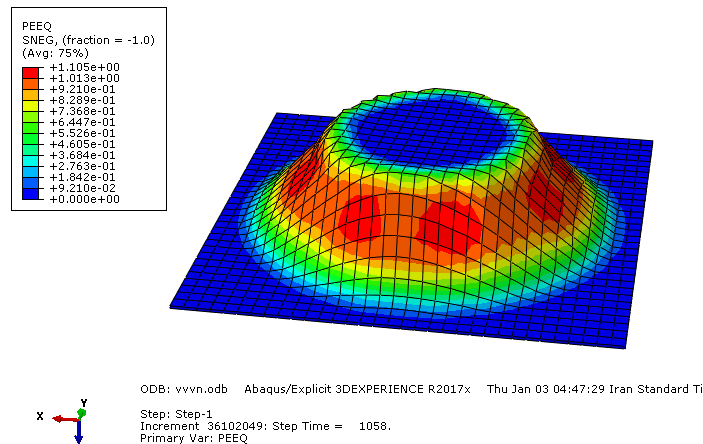
Three-dimensional Deformation of the model.
What You Will Learn
- What Incremental Sheet Forming (ISF) is.
- How to model an ISF process in Abaqus.
- How to define the aluminum sheet.
- How to define the forming tool and rigid surface.
- How to define contact between the sheet and the tool.
- How to use a friction coefficient of 0.15.
- How to define a circular tool path in the X-Y plane.
- How the tool gradually deforms the sheet.
- How to obtain the final truncated cone shape.
- How to evaluate the dimensions of the final formed geometry.
Key Features
- Incremental Sheet Forming (ISF) simulation.
- Aluminum sheet with dimensions of 230 × 230 × 1.5 mm.
- Three-dimensional analytical rigid surface.
- Circular forming tool path in the X-Y plane.
- Sheet-tool friction coefficient of 0.15.
- Final truncated cone geometry.
- Maximum circle diameter of 194 mm.
- Minimum circle diameter of 106 mm.
- Step-by-step Abaqus video tutorial.
- CAE file.
- INP file.
- Excel file containing X, Y, Z amplitude data.
- Excel file containing material data.
Project Information
Important information about this project
Payment & Support
Need help with your purchase?
Secure Payment
Your payment is processed securely through our online payment system.
Need Help?
If you have any questions about this product, please contact us by email.
saeedofmoeini@gmail.com
There are no reviews yet.