
Project Overview
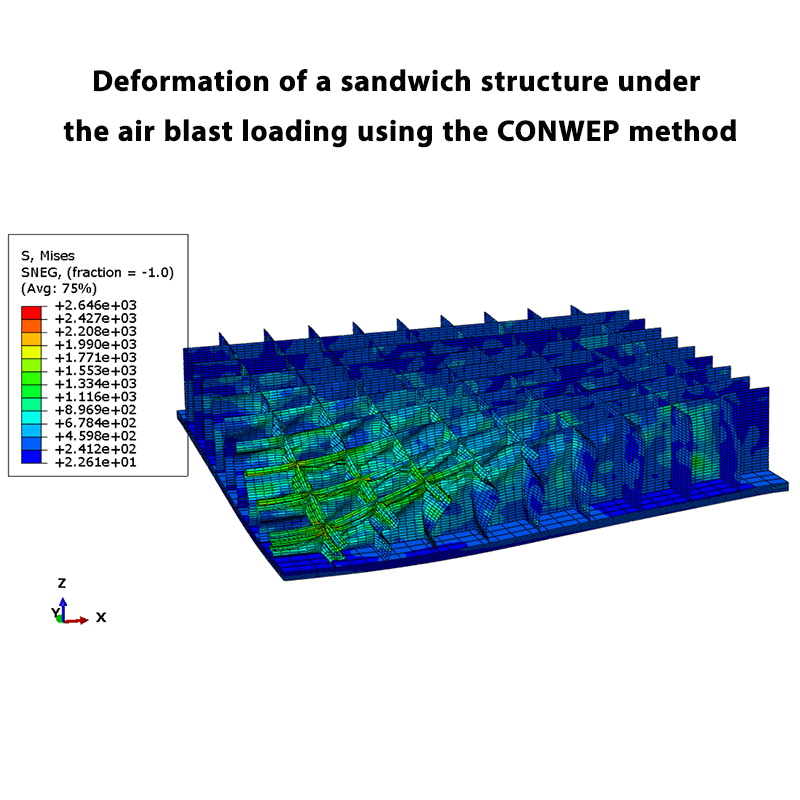
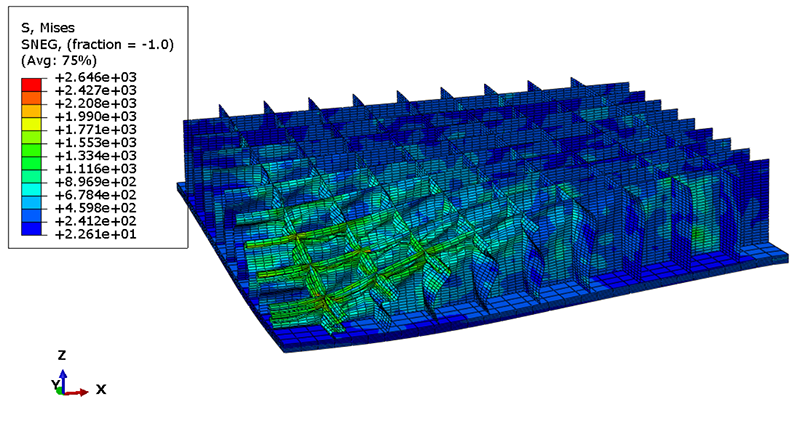
This tutorial focuses on the deformation of a sandwich structure under air blast loading using the CONWEP method in the Abaqus software.
The main objective of this example is to investigate the effect of different TNT charges on the deformation of the sandwich structure. In this study, the effects of 1 kg, 2 kg, and 3 kg of TNT are investigated, and the resulting vertical displacement of the structure is evaluated.
Problem Description
The sandwich structure consists of a honeycomb core placed between two plates. The top and bottom plates are connected to the honeycomb core, forming the complete sandwich structure.
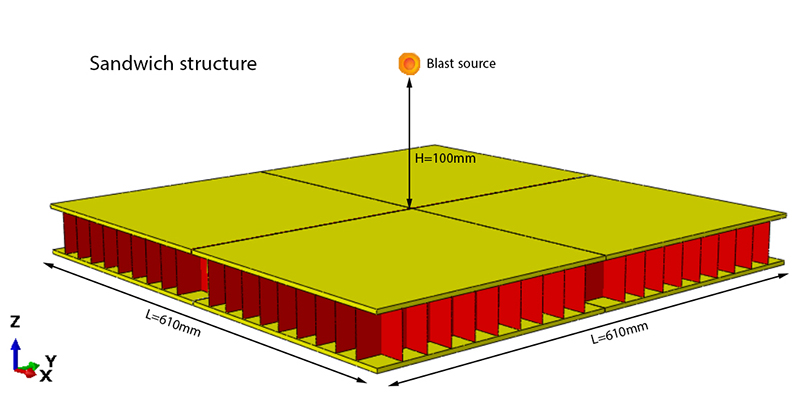
The blast source is located 100 mm above the top surface of the sandwich structure. Different explosive masses, including 1 kg, 2 kg, and 3 kg of TNT, are considered to investigate their effects on the structural response.
Sandwich Structure
The sandwich structure is composed of one honeycomb core and two plates positioned above and below the core.
Since the honeycomb core is welded to the top and bottom plates, a Tie Constraint is used in Abaqus to define the interaction between the components.
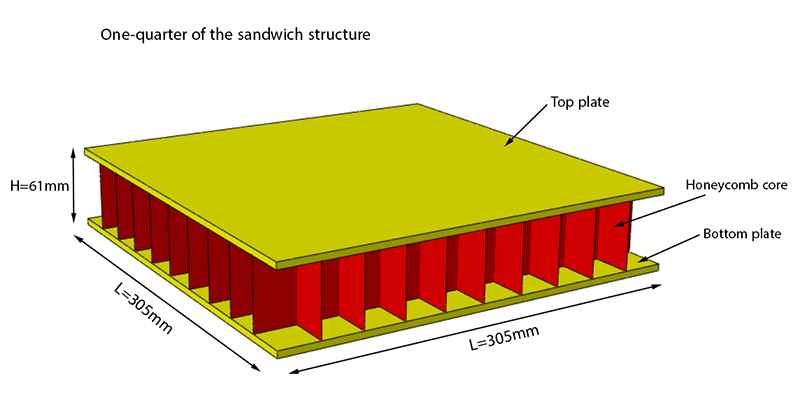
Due to the symmetry of the sandwich structure, only one-fourth of the structure is modeled in order to reduce the computational cost of the analysis.
Air Blast Loading Using CONWEP
The CONWEP method is used to simulate the air blast loading in Abaqus. One of the main advantages of this method is that there is no need to model the actual geometric shape of the explosive.
In addition, the material properties of the explosive do not need to be defined. Instead, the mass and location of the explosive are specified in the Abaqus model.
In this example, the blast source is positioned 100 mm above the top surface of the sandwich structure. The response of the structure is investigated for TNT charges of 1 kg, 2 kg, and 3 kg.
Vertical Displacement
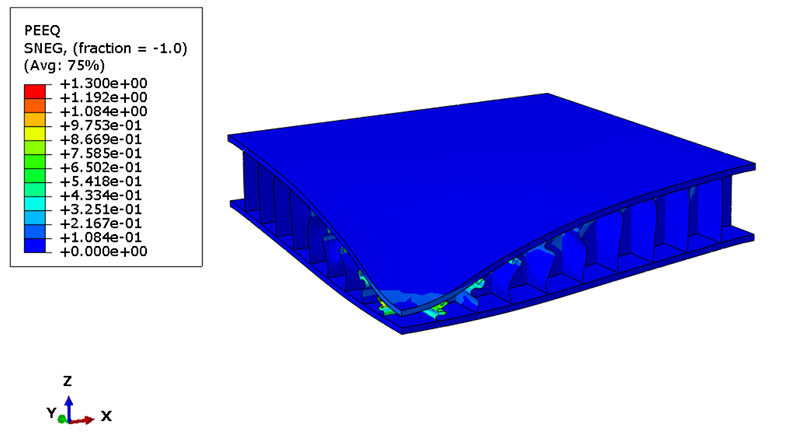
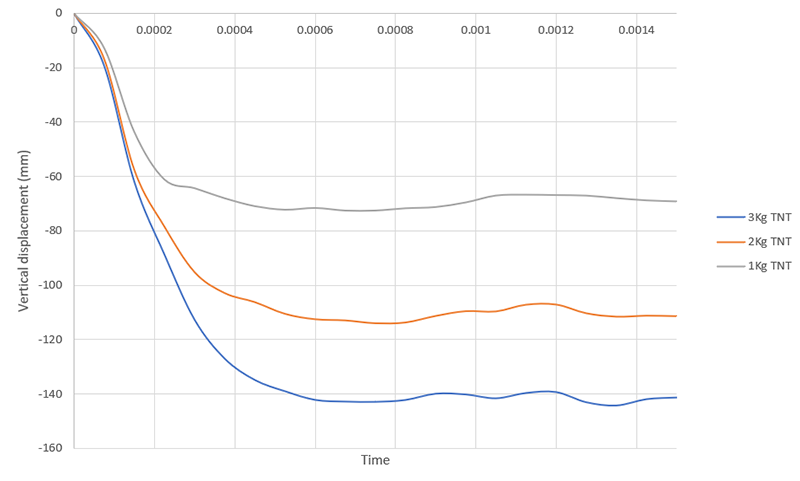
The main parameter used to evaluate the response of the sandwich structure is the vertical displacement at the center of the structure.
The vertical displacement is obtained from the Abaqus simulation and used to evaluate the deformation of the sandwich structure under the different TNT charges.
Effect of TNT Charge
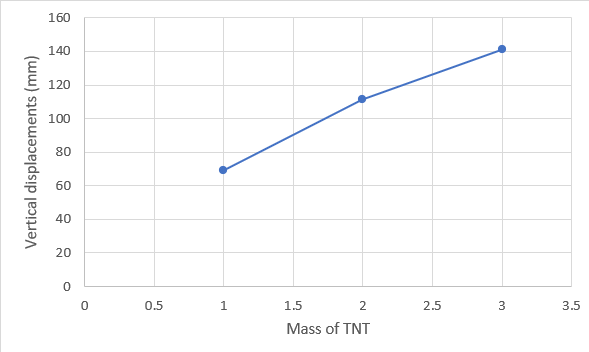
The maximum vertical displacement of the sandwich structure is investigated for 1 kg, 2 kg, and 3 kg of TNT. The results allow the effect of the explosive mass on the structural deformation to be evaluated.
What You Will Learn
- How to model a sandwich structure in Abaqus.
- How to model a honeycomb core between two plates.
- How to define the interaction between the honeycomb core and plates using Tie Constraint.
- How to take advantage of structural symmetry to reduce the computational cost.
- How to simulate air blast loading using the CONWEP method.
- How to define the mass and location of an explosive in CONWEP.
- How to obtain the vertical displacement of the sandwich structure.
- How to investigate the effect of different TNT charges on structural deformation.
Key Features
- Air blast loading simulation.
- CONWEP method in Abaqus.
- Sandwich structure with a honeycomb core.
- 1 kg, 2 kg, and 3 kg TNT blast loads.
- 100 mm stand-off distance.
- Tie Constraint between the core and plates.
- Quarter-symmetry modeling.
- Vertical displacement evaluation.
- Free Abaqus tutorial.
Project Information
Important information about this project
Payment & Support
Need help with this tutorial?
Free Tutorial
This Abaqus tutorial is available free of charge.
Need Help?
If you have any questions about this tutorial, please contact us by email.
saeedofmoeini@gmail.com
ali
hi i need this
Admin
Hello
This tutorial is free, Click on “add to cart” then continue the steps.