
Project Overview
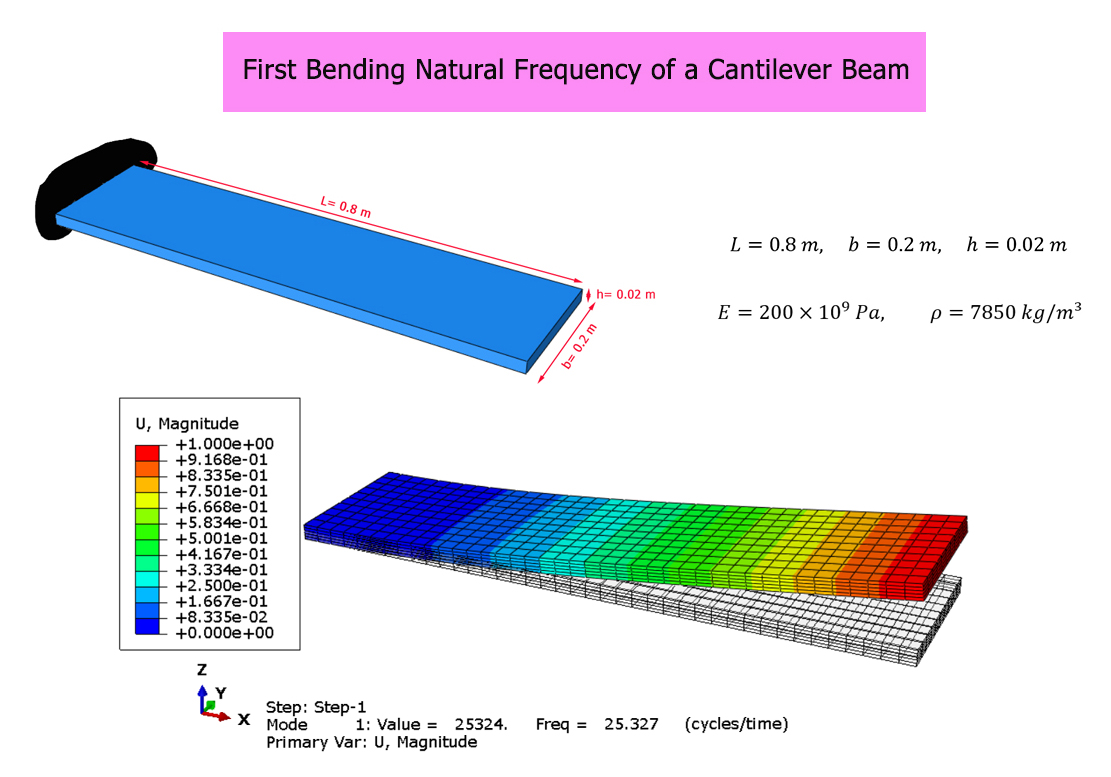
In this training, we first calculate the first bending natural frequency of a cantilever beam using the Abaqus software. Then, the result is compared with the Analytical Solution based on Euler–Bernoulli beam theory to evaluate the accuracy of the numerical results.
Model Description
The model consists of a steel cantilever beam with a length of 0.8 m, a width of 0.2 m, and a thickness of 0.02 m.
The material properties are defined as follows: Young's modulus is 200 GPa, Poisson's ratio is 0.3, and the material density is 7850 kg/m³.
One end of the beam is fixed, while the other end is free to vibrate. The model is used to determine the first bending natural frequency and to verify the numerical results obtained from the Abaqus simulation.
Abaqus Simulation
First, the cantilever beam is simulated using the Abaqus software to obtain its first bending natural frequency.
A frequency analysis is performed to calculate the natural frequencies and corresponding mode shapes. The first bending mode is identified from the deformation pattern.
The first bending natural frequency obtained from the Abaqus software is equal to 25.327 Hertz.
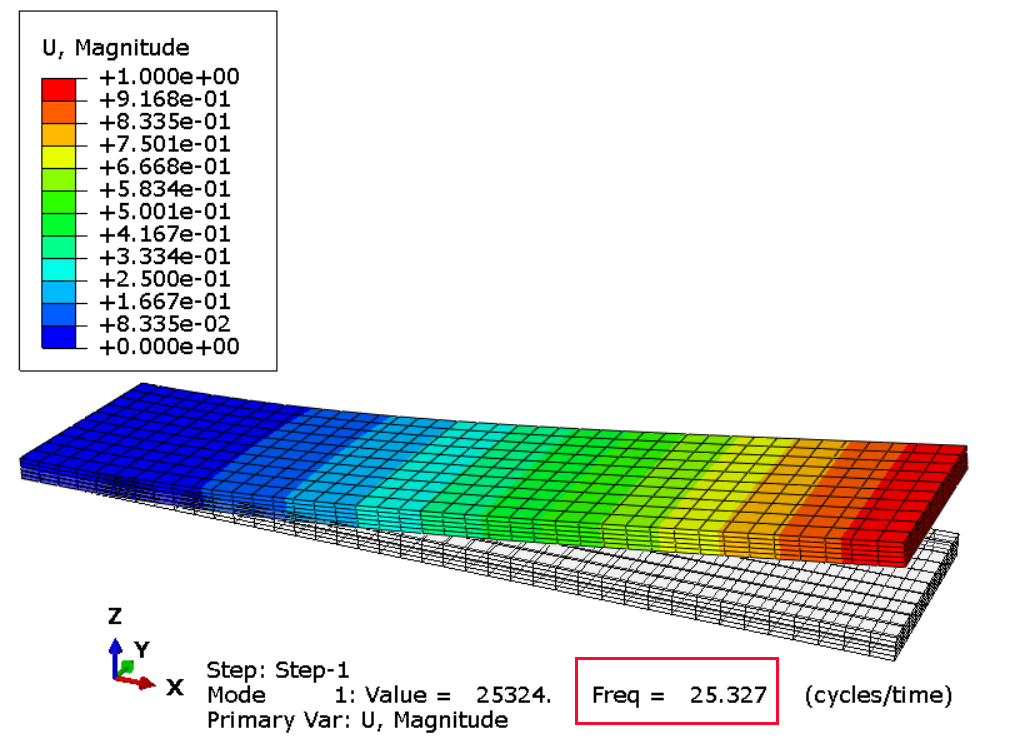
Identification of the First Bending Mode
In the Abaqus results, the first bending mode is identified from its mode shape. The beam bends in the transverse direction, with the displacement increasing toward the free end while the fixed end remains constrained.
The mode shape helps identify the first bending vibration mode and distinguish it from other possible vibration modes.
Analytical Solution
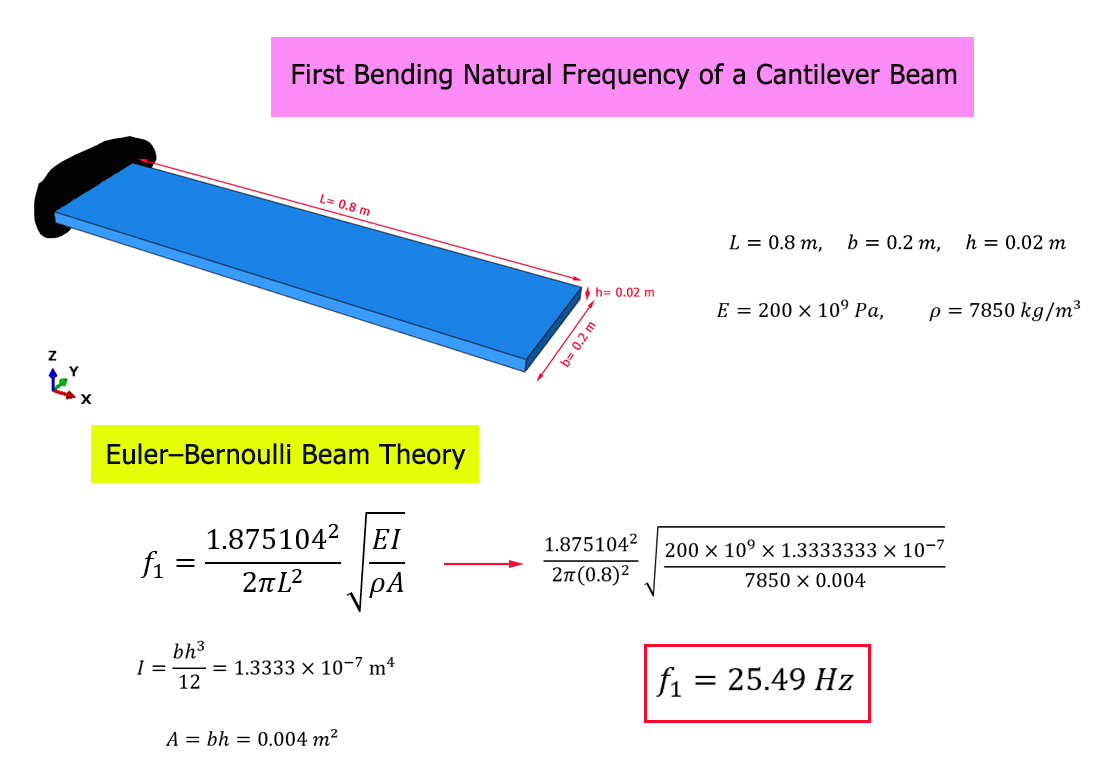
Next, the first bending natural frequency of the cantilever beam is calculated using the Analytical Solution based on Euler–Bernoulli beam theory.
For a uniform cantilever beam, the first bending natural frequency can be calculated using the following equation:
f1 = (β12 / 2πL2) √(EI / ρA)
In this equation, E is Young's modulus, I is the second moment of area of the cross-section about the bending axis, ρ is the material density, A is the cross-sectional area, and L is the beam length. For the first bending mode of a cantilever beam, β1 is approximately 1.8751.
The first bending natural frequency obtained from the Analytical Solution is equal to 25.49 Hertz.
Comparison of Results
The results obtained from the Abaqus software are compared with those obtained from the Analytical Solution based on Euler–Bernoulli beam theory.
The first bending natural frequency obtained from Abaqus is 25.327 Hz, while the value obtained from the Analytical Solution is 25.49 Hz.
The difference between the Abaqus result and the Analytical Solution is approximately 0.64%, showing very good agreement between the numerical and analytical results.
What You Will Learn
- How to model a cantilever beam in Abaqus.
- How to define material properties and density in Abaqus.
- How to apply boundary conditions to a cantilever beam.
- How to perform a natural frequency analysis.
- How to calculate the first bending natural frequency using Euler–Bernoulli beam theory.
- How to obtain the first bending natural frequency using Abaqus.
- How to identify the first bending mode from the mode shape.
- How to compare Abaqus results with the Analytical Solution.
- How to evaluate the accuracy of a numerical vibration model.
Key Features
- Bending vibration analysis of a cantilever beam.
- Three-dimensional solid finite element model.
- Steel material properties.
- First bending natural frequency calculation.
- Analytical Solution based on Euler–Bernoulli beam theory.
- Abaqus numerical simulation.
- Identification of the first bending mode shape.
- Comparison between Abaqus and Analytical Solution.
- Percentage difference of approximately 0.64%.
- Free Abaqus tutorial.
Project Information
Important information about this project
Payment & Support
Need help with this tutorial?
Free Tutorial
This Abaqus tutorial is available free of charge.
Need Help?
If you have any questions about this tutorial, please contact us by email.
saeedofmoeini@gmail.com
There are no reviews yet.