
Project Overview
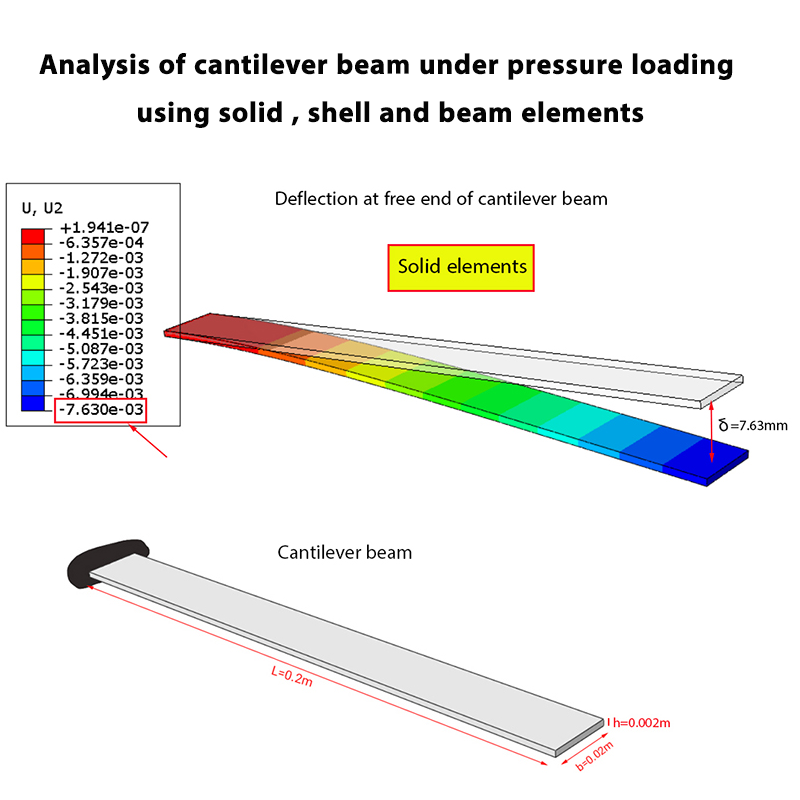
This Abaqus tutorial is designed to help you understand whether the type of element affects the results obtained from the Abaqus software.
In this training, the same problem is modeled using three different types of elements: Solid elements, Shell elements, and Beam elements. The results obtained from these three models are then compared with each other.
Problem Description
In this problem, we investigate whether changing the element type can affect the results of an Abaqus analysis.
For this purpose, the same structural problem is modeled using Solid, Shell, and Beam elements. The corresponding results are obtained from each model and compared together.
The main objective of this tutorial is to demonstrate the effect of the selected element type on the numerical results and to help you understand when different element formulations can be used to model the same structural problem.

Parameters Selected for Comparison
We selected two parameters to investigate the effect of the element type on the results: the deflection at the free end of the beam and the longitudinal stress.
These two parameters are obtained using Solid, Shell, and Beam elements and are compared with the results obtained from the exact solution.
Analytical Solution
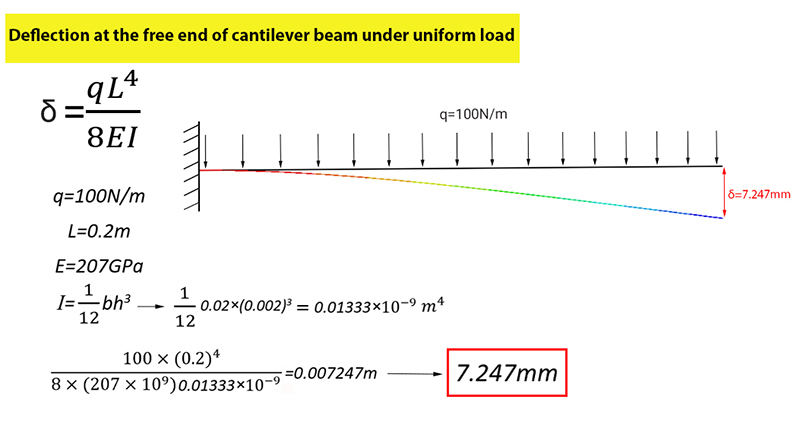
In this section, the deflection at the free end of the beam and the longitudinal stress are calculated using the analytical solution.
The results obtained from the analytical solution are then compared with the corresponding results obtained from the Abaqus software using Solid, Shell, and Beam elements.

Solid Element Model
First, the problem is modeled using Solid elements. The model is analyzed in Abaqus and the required results are obtained.

Shell Element Model
Next, the same problem is modeled using Shell elements. The results obtained from this model are then compared with the results of the Solid element model.

Beam Element Model
Finally, the same structural problem is modeled using Beam elements. The results obtained from the Beam element model are compared with those obtained from the Solid and Shell models.

Comparison of Results
The results obtained from the three models are compared to investigate the effect of the element type on the Abaqus results.
This comparison helps demonstrate whether Solid, Shell, and Beam elements can produce similar results when they are used to represent the same structural behavior.
What You Will Learn
- How to model the same problem using Solid elements in Abaqus.
- How to model the same problem using Shell elements in Abaqus.
- How to model the same problem using Beam elements in Abaqus.
- How the selected element type can affect Abaqus results.
- How to compare results obtained from different element formulations.
- How to select an appropriate element type for a structural analysis.
Key Features
- Comparison of Solid, Shell, and Beam elements.
- Same problem modeled using different element types.
- Comparison of Abaqus numerical results.
- Practical Abaqus modeling approach.
- Understanding the effect of element type on results.
- Free Abaqus tutorial.
Project Information
Important information about this project
Payment & Support
Need help with this tutorial?
Free Tutorial
This Abaqus tutorial is available free of charge.
Need Help?
If you have any questions about this tutorial, please contact us by email.
saeedofmoeini@gmail.com
UBAID ULLAH KHAN
Plz send the material which you want to provide at zero cost.
Admin(verified owner)
You can download all the files, including the full video , Cae file , inp file , Excel file and …, from the site for free