
Project Overview
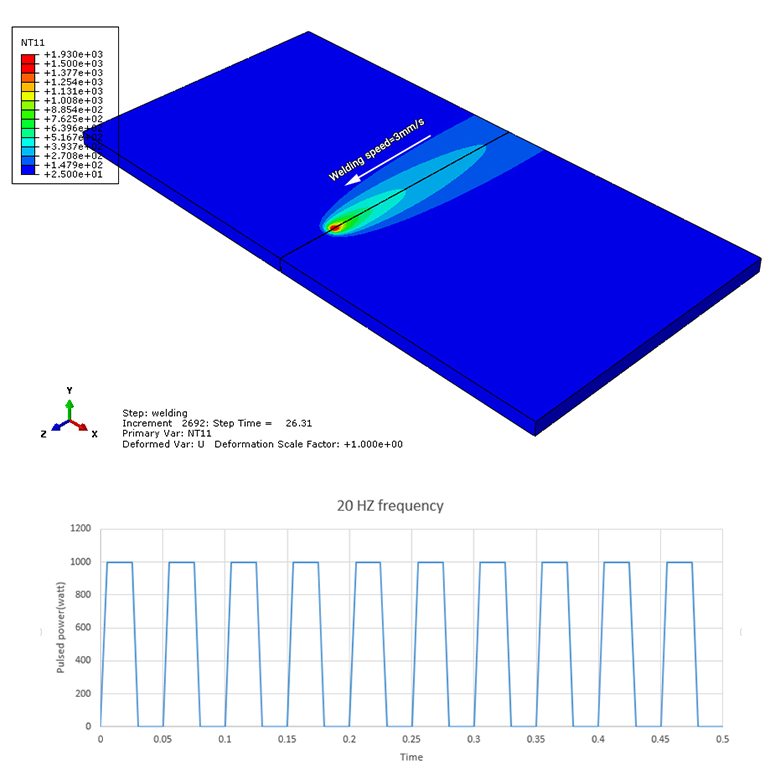
In this example, the pulse welding process is simulated using the DFLUX subroutine in Abaqus software.
A volumetric heat flux is used to simulate the welding process. The Goldak's double-ellipsoid heat source model is adopted to define the volumetric heat flux around the welding pool.
The DFLUX subroutine is used to define the Goldak's double-ellipsoid heat source as well as the pulsed welding power.
The DFLUX subroutine defines the nonuniform heat flux produced by the moving welding heat source.
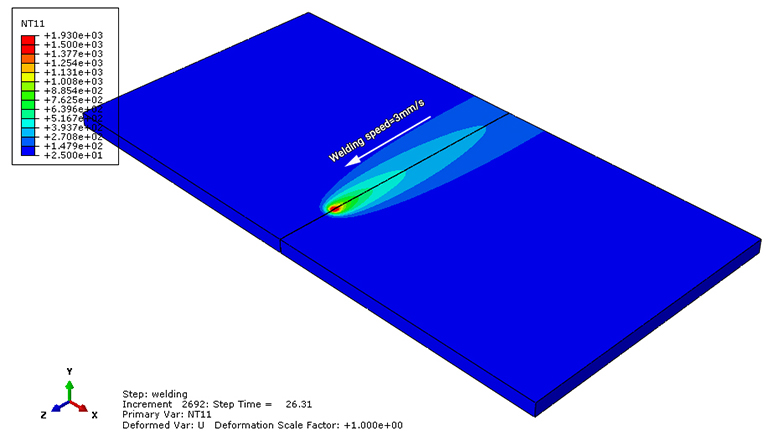
Simulation of pulse welding using the DFLUX subroutine.
Goldak's Double-Ellipsoid Heat Source
The Goldak's double-ellipsoid heat source model is adopted to calculate the volumetric heat flux distribution around the welding pool.
The equations of the Goldak heat source model are defined as a function of position and time, together with several heat source parameters.
The constants a, b, Cf, and Cr are heat source parameters that define the size and shape of the ellipses. These parameters are obtained from experimental analysis.
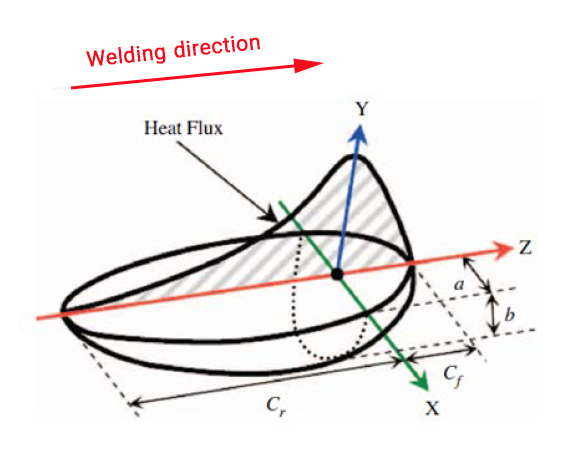
Goldak's double-ellipsoid heat source used to calculate the volumetric heat flux distribution.
Pulsed Welding Power
In this example, the welding power Q is defined in pulse form.
The pulsed power is defined using the DFLUX subroutine. The power diagram has a frequency of 20 Hz and a peak power of 1000 W.
Therefore, the heat input is not constant during the welding process. Instead, the welding power varies according to the defined pulse pattern.
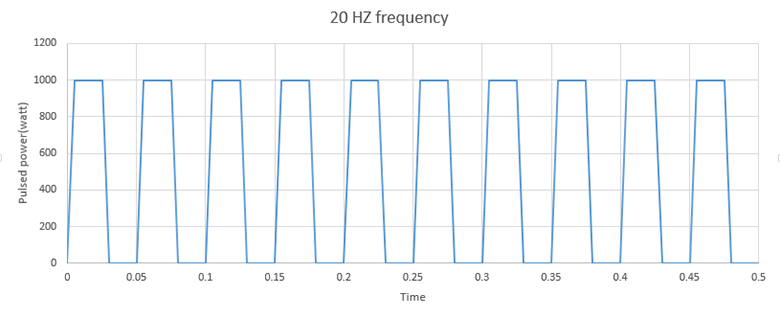
Pulsed welding power with a frequency of 20 Hz and a peak power of 1000 W.
Welding and Cooling Process
The analysis is performed in two steps.
In the first step, the welding process is simulated for a duration of 33.34 seconds. During this step, the pulsed volumetric heat flux is applied using the DFLUX subroutine.
In the second step, the welding heat source is removed and the cooling process is simulated for a duration of 1000 seconds.
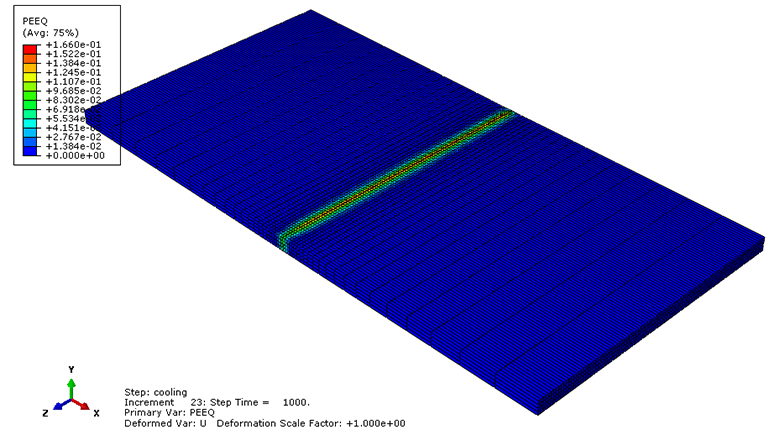
Welding stage followed by the cooling stage.
Thermal-Mechanical Analysis
Two Coupled Temperature-Displacement steps are defined to simulate the thermal and mechanical behavior of the welded plate.
This analysis considers the temperature field and the resulting mechanical response of the plate during the welding and cooling processes.
Material Properties
The material of the plate is SUS304 stainless steel.
The material properties are defined as temperature-dependent properties.
- Density
- Thermal conductivity
- Specific heat
- Thermal expansion
- Elastic properties
- Plastic properties
Residual Stress
After the welding and cooling processes, the residual stress in the welded plate is evaluated.
The S33 stress component is used to investigate the residual stress distribution.
The results include the transversal residual stress, which represents the residual stress in the direction perpendicular to the welding path.
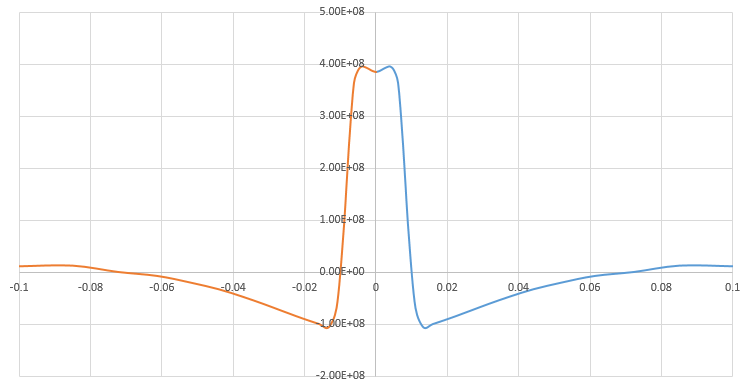
Transversal residual stress (S33) perpendicular to the welding path.

Transversal residual stress (S33) perpendicular to the welding path.
What You Will Learn
- How to simulate pulse welding in Abaqus.
- How to use the DFLUX subroutine for pulse welding.
- How to define a volumetric heat flux.
- How to implement Goldak's double-ellipsoid heat source.
- How to define a nonuniform heat flux using DFLUX.
- How to define pulsed welding power.
- How to define the welding power Q as a function of time.
- How to define a pulsed power frequency of 20 Hz.
- How to define a peak welding power of 1000 W.
- How to define Goldak heat source parameters.
- How to define the parameters a, b, Cf, and Cr.
- How to perform a 33.34-second welding step.
- How to perform a 1000-second cooling step.
- How to perform a Coupled Temperature-Displacement analysis.
- How to define temperature-dependent material properties.
- How to evaluate residual stress after welding.
- How to evaluate the S33 stress component.
- How to obtain transversal residual stress.
- How to implement a Fortran DFLUX subroutine in Abaqus.
Key Features
- Pulse welding simulation in Abaqus.
- DFLUX Fortran subroutine.
- Volumetric heat flux.
- Goldak's double-ellipsoid heat source model.
- Nonuniform heat flux distribution.
- Pulsed welding power.
- Pulse frequency: 20 Hz.
- Peak power: 1000 W.
- 33.34-second welding stage.
- 1000-second cooling stage.
- Two Coupled Temperature-Displacement steps.
- Temperature-dependent material properties.
- SUS304 stainless steel.
- Goldak heat source parameters a, b, Cf, and Cr.
- S33 residual stress evaluation.
- Transversal residual stress.
- Research article included.
Project Information
Important information about this project
Payment & Support
Need help with your purchase?
Secure Payment
Your payment is processed securely through our online payment system.
Need Help?
If you have any questions about this product, please contact us by email.
saeedofmoeini@gmail.com
There are no reviews yet.